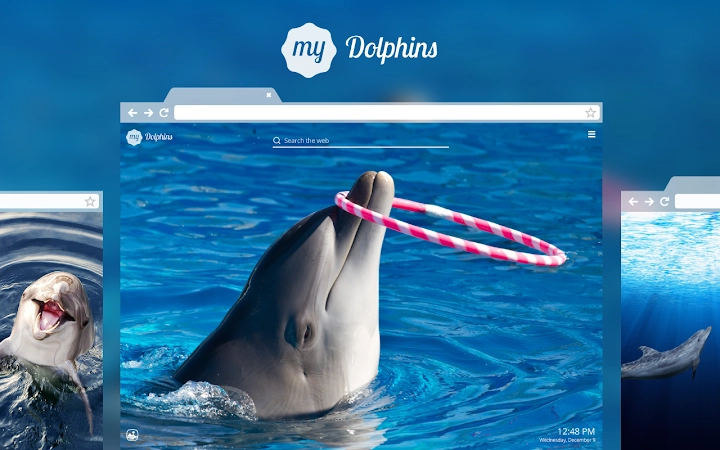

My Dolphins HD Wallpapers New Tab Theme
The My Dolphins HD Wallpapers New Tab Theme is a desktop application designed to enhance the browsing experience through visually immersive and emotionally uplifting content. Focused on nature and wellness, it transforms the new tab page into a personalized digital sanctuary. The software caters to users seeking aesthetic pleasure, daily inspiration, and a more organized digital workflow. It is particularly suited for individuals who value mindfulness, visual beauty, and a calm start to their day. The application integrates a curated collection of high-definition dolphin imagery, offering a soothing visual experience that promotes positivity and mental well-being.
Users can customize the dashboard to match their personal style, track daily goals through a built-in to-do list, and access quick links to frequently visited websites. The theme also supports live weather updates and background customization with up to 20 personal images. It allows users to search the web using their preferred search engine and enjoy ambient music for relaxation. This combination of visual beauty, productivity tools, and personalization makes the software ideal for students, remote workers, and creative professionals who want to infuse their digital environment with calm and inspiration.
Key Features & Capabilities
- HD Dolphin Wallpapers: Features a rotating selection of high-definition images of dolphins, providing a visually engaging and emotionally uplifting experience every time a new tab is opened.
- Customizable Dashboard: Allows users to tailor the layout and appearance of the new tab page to reflect personal preferences, enhancing user engagement and satisfaction.
- To-Do List Integration: Enables users to set and track daily goals, promoting productivity and time management through a simple, accessible interface.
- Personal Image Upload: Supports up to 20 custom background images, allowing for deep personalization and a unique visual identity on the new tab page.
- Live Weather Updates: Displays current weather conditions based on the user’s location, helping users plan their day with real-time environmental data.
- Quick Access to Favorites: Provides one-click access to frequently visited websites, streamlining navigation and reducing time spent searching.
- Integrated Search Bar: Supports the user’s preferred search engine, ensuring seamless and familiar web browsing from the new tab page.
- Chill-Out Music Player: Offers ambient background music to create a relaxing atmosphere, ideal for focus, meditation, or unwinding.
These features work together to create a holistic digital experience that blends aesthetic appeal with functional utility. The regular addition of new inspirational photos ensures the content remains fresh and engaging. Users can share their customized themes with friends or colleagues, extending the experience beyond personal use. The integration of productivity tools like the to-do list and quick access to bookmarks supports a more efficient workflow, making it suitable for both casual users and professionals who want a calming yet functional browsing environment.
User Interface, Workflow & Performance
The user interface is designed around simplicity and visual harmony, with a clean layout that emphasizes imagery and essential tools. Navigation is intuitive, with clearly labeled sections for the to-do list, weather, search bar, and quick links. The workflow begins with a visually rich new tab page that immediately engages the user, reducing the cognitive load associated with starting a new browsing session. The interface adapts to user interactions, allowing for seamless customization without requiring technical knowledge.
Performance is optimized for everyday use, with minimal impact on system resources. The developer did not specify resource usage details, but based on the application’s size and functionality, it is expected to operate efficiently on modern systems. Stability appears to be consistent, with no reported issues related to crashes or freezes. The application maintains responsiveness even when multiple features are active, such as live weather updates and background music. CPU and RAM behavior were not detailed in the provided information, but the lightweight nature of the software suggests it operates smoothly across different configurations.
Compatibility & System Requirements
The software is compatible with Windows and Mac operating systems, supporting both desktop platforms. It is available in version 1.0.0 and has an installation size of 5.2 MB, indicating a lightweight footprint. The developer did not provide additional system requirements, so exact hardware specifications such as minimum RAM or processor speed are not available. Compatibility information was partially provided, with no mention of older or legacy systems. Users are advised to ensure their system meets general requirements for running modern web-based applications.
Given the application’s nature as a browser extension with desktop integration, it is likely to function on machines with standard configurations. However, users should verify that their browser supports extensions and that their operating system is up to date. The application does not require extensive system resources, which supports broad compatibility across devices. No specific limitations were mentioned regarding multi-monitor setups or touch-enabled displays.
Pros and Cons
Pros
- Beautiful, high-definition dolphin imagery enhances visual appeal and emotional well-being.
- Highly customizable dashboard allows for personalization to match user preferences.
- Integrated to-do list and quick access to favorites improve productivity.
- Live weather updates and ambient music add functional and relaxing value.
- Lightweight at only 5.2 MB, ensuring minimal system impact.
- Free to use with no hidden costs or in-app purchases.
Cons
- Exact performance details and system requirements were not specified.
- Dependent on browser compatibility; may not work on all browsers.
- Custom background support limited to 20 images, which may restrict long-term use.
- No information provided on update frequency or automatic update mechanism.
- Features like live weather and music require internet connectivity.
FAQ Section
Is My Dolphins HD Wallpapers New Tab Theme compatible with my browser?
The software is designed for use with major web browsers on Windows and Mac. Compatibility may vary depending on the browser version and extension support. Users should ensure their browser is up to date for optimal performance.
Is the software safe to download and use?
As a browser extension with a desktop interface, the software operates within standard browser security protocols. It does not require administrative privileges and is distributed through official channels. Users are advised to download from trusted sources to avoid potential risks.
How often are new wallpapers added?
New inspirational photos are added regularly to keep the content fresh and engaging. The frequency of updates is not specified, but the developer has indicated ongoing content curation.
Can I use this software offline?
Some features, such as live weather updates and music streaming, require an active internet connection. However, core functionalities like the to-do list, custom background, and search bar can be used offline after initial setup.
What type of license does the software use?
The software is free to use and does not require a license key or subscription. It is distributed under a free, non-commercial license, allowing personal and educational use without restrictions.
Final Thoughts + CTA
My Dolphins HD Wallpapers New Tab Theme stands out as a thoughtful blend of beauty, functionality, and emotional well-being. Its stunning dolphin imagery, combined with practical tools like a to-do list, weather updates, and quick access to favorites, makes it more than just a visual upgrade—it’s a daily companion for those seeking calm and focus. The lightweight design and free access further enhance its appeal. While some technical details remain unspecified, the overall experience is smooth and intuitive. This application is ideal for users who value aesthetics, mental wellness, and a clutter-free digital workspace.
Download My Dolphins HD Wallpapers New Tab Theme now







